
Why isn't my fitness studio showing up on Google Maps?
Find out why your fitness studio isn't appearing on Google Maps, what to check first, and how to choose the right fix.
Short answer
If your studio isn't showing on Google Maps, first search its exact name. If it's missing there too, the likely problem is the Google Business Profile itself: verification, suspension, duplicate listings, access, or incorrect information. If it appears by name but not for searches like “Pilates studio,” Google can find the business but may see other studios as a better match. Check the category, services, website clarity, reviews, and distance before deciding what to fix.
On this page
Start with one distinction: can customers find the studio by its exact name, or does it only disappear for service searches?
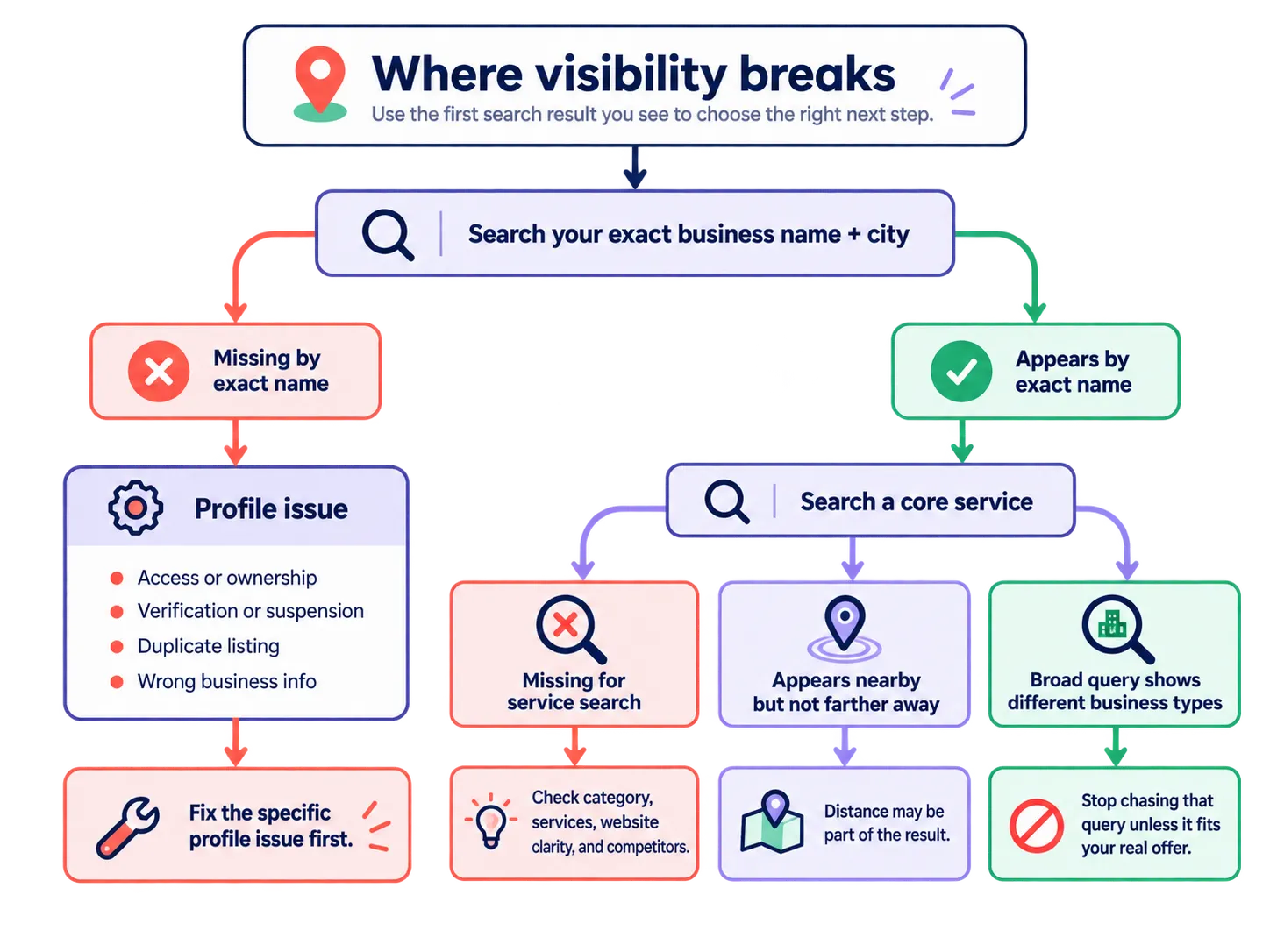
The goal is to identify the clearest problem and make one useful correction, not to run a full local SEO audit.
If local visibility is only one of several weaknesses, use the broader gym-marketing guide to decide which problem deserves attention first.
Start with the studio’s exact business name
Search the business name plus the city in both Google Maps and Google Search. If the correct profile appears, confirm that the address or service area, phone number, hours, website, and booking destination are accurate.
If the profile does not appear, sign in to the Google account used to manage it. Google’s verification guidance explains how to find, claim, or verify a profile. Check for a few common problems:
- the person managing the studio no longer has access;
- the profile is suspended or disabled;
- an old location is still representing the business;
- another profile exists for the same studio.
Google says a duplicate profile may not appear on Search or Maps and provides a process for resolving duplicate profiles and ownership. If a profile already exists, do not create another one just because the current listing is hard to access.
The business name should also match the real-world name customers see. Google’s Business Profile guidelines warn against adding extra keywords to the name. If the studio is called Harbor Pilates, changing it to “Harbor Pilates Best Reformer Classes Downtown” creates a new problem instead of fixing the original one.
If the correct profile appears by name and its basic information is accurate, move on to the searches a new customer would use.
Check the studio’s core service searches
Choose two or three searches that describe the studio’s main business. A Pilates studio might use:
Pilates studioreformer PilatesPilates studio Raleigh
Use the equivalent core searches for a yoga studio, boxing gym, barre studio, or other business. Do not test every class name on the schedule.
If the studio is missing for an important service search, check the information that tells Google and customers what the business is:
- Does the primary Business Profile category accurately describe the studio’s main business?
- Are the core services visible on the profile?
- Does the relevant website page clearly state the service and location?
- Do the profile, website, and booking destination agree on the basics?
Google says categories affect local ranking and recommends choosing the most specific primary category that accurately describes the main business. If a Pilates studio is using a broad category such as “Physical fitness program” when a more accurate available category fits, correct the category. Do not keep switching categories to see what happens.
The same principle applies to services and the website. If an important service is missing from the profile or difficult to find on the website, make the real offer clearer rather than adding generic local-search copy.
Compare what Google shows instead
If the profile is accurate but the studio still does not appear for an important service search, look at a few businesses Google does show for that same query.
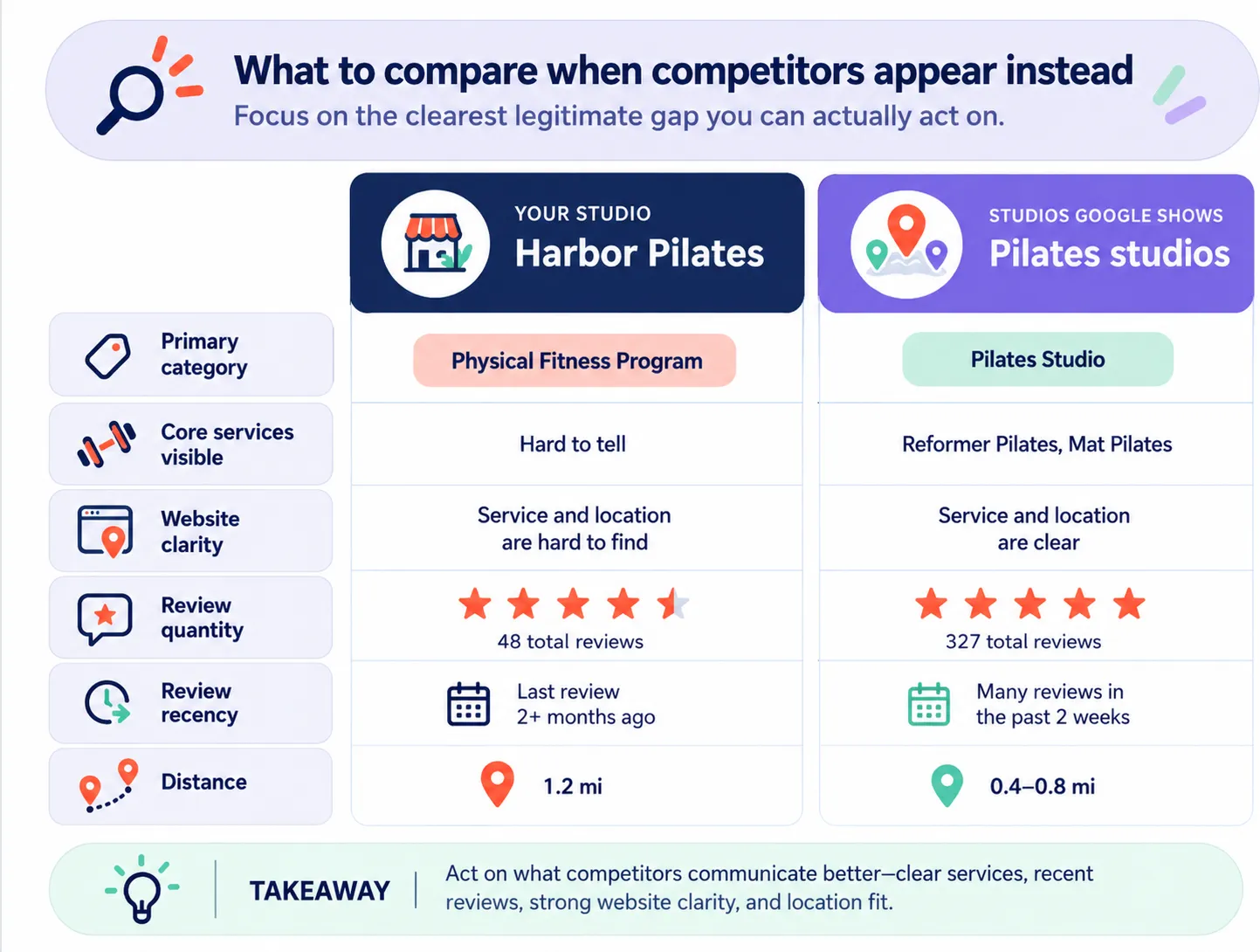
Google says local results are mainly influenced by relevance, distance, and prominence. That means a studio can be a good match and still appear differently depending on the search wording, where the customer is searching from, and the strength of nearby alternatives.
Compare only differences that could change your next action:
- Are the businesses shown actually the same type of studio?
- What primary categories and services do they show?
- Are they much closer to the search area?
- Is their review history noticeably stronger or more recent?
- Do their websites make the service and location clearer?
If results look different between Google Maps and the local business results in Google Search, repeat the same important query from one consistent, realistic customer area. You do not need a spreadsheet or a large location grid. You only need enough comparison to tell whether the problem is a clear business-information gap, a competitive result, or normal location variation.
Also pay attention to the businesses Google considers relevant. If a broad search such as fitness classes is mostly showing large gyms, recreation centers, or businesses serving a different customer need, a Pilates studio may simply be chasing the wrong query. Do not distort the profile or website to pursue a search that does not describe what the studio actually sells.
A simple example
The following example is fictional and illustrative.
| Search | What Harbor Pilates sees | What it should do |
|---|---|---|
Harbor Pilates Raleigh |
The correct profile appears with accurate details. | No profile-availability problem to fix. |
Pilates studio |
Harbor is missing while nearby Pilates studios appear. | Check category, services, website clarity, and the visible competitors. |
reformer Pilates |
Harbor appears close to the studio but disappears farther away. | Treat distance as part of the result and fix only genuine relevance gaps. |
The important point is that the same studio can have different visibility problems for different searches. The first useful action depends on which problem you actually see.
Fix the clearest problem first
Once the likely problem is clear, keep the response narrow:
- Missing or inaccessible profile: resolve verification, access, suspension, duplicate, or inaccurate-information problems before doing broader optimization work.
- Weak service match: correct the clearest legitimate gap in the primary category, visible services, or relevant website page. Review what a studio website should make easy to find if the service, location, schedule, or next step is hard to understand.
- Comparable studios consistently rank ahead: address the most obvious legitimate difference you can influence. If review history is the clearest gap, build a steady process for earning authentic reviews rather than reacting to one search with a sudden campaign. See how often a studio should receive new Google reviews.
- Distance appears to be the main difference: recognize that editing the profile cannot make the studio physically closer to every searcher.
- The query does not describe the studio well: stop pursuing it unless the studio genuinely serves that customer need.
Avoid changing the category, website, profile details, and review process all at once. Make the clearest correction first.
Check the same search again
After the change is visible publicly, repeat the same important search from roughly the same area. The question is simple: did the problem you identified improve?
If customers can find the studio by name, the profile is accurate, and the obvious service-match gaps are fixed but important searches remain weak, the issue is more likely competitive local visibility than a broken Business Profile. At that point, compare the businesses winning those searches and choose the next legitimate gap rather than making another random profile edit.
Sources
- Google guidance on local ranking
- Google guidelines for representing your business
- Google guidance on Business Profile categories
- Google guidance on Business Profile services
- Google guidance on how profile information is sourced
- Google guidance on Business Profile verification
- Google guidance on duplicate profiles and ownership
- Google Business Profile performance guidance
A clearer next step
Know what to improve first, not just what changed.
StudioCues monitors the public signals around your studio and turns them into focused, evidence-backed priorities.